
 gitlab project 🡭
Behind Staxis
The idea behind Staxis is to provide a structured approach to developing applications built with Node.js. NPM, on the other hand, returns to its core function: managing dependencies, which should always be merely an extension of Node.js and never part of your software.
For application code, Staxis offers a system—the linear stack—that you can organize, export, and reuse without a blind, massive reliance on extensions.
This allows you to scale your application while keeping it clear where each layer added to the stack has its own specific responsibility.
You can import or export everything as a pack or ZIP file, however you like—locally, pack by pack, all at once, online, via Git, into specific folders, etc.
Staxis thus represents your entire project, which, through the orchestrator, file by file, communicates with Node.js.
One image is bettere than everything:
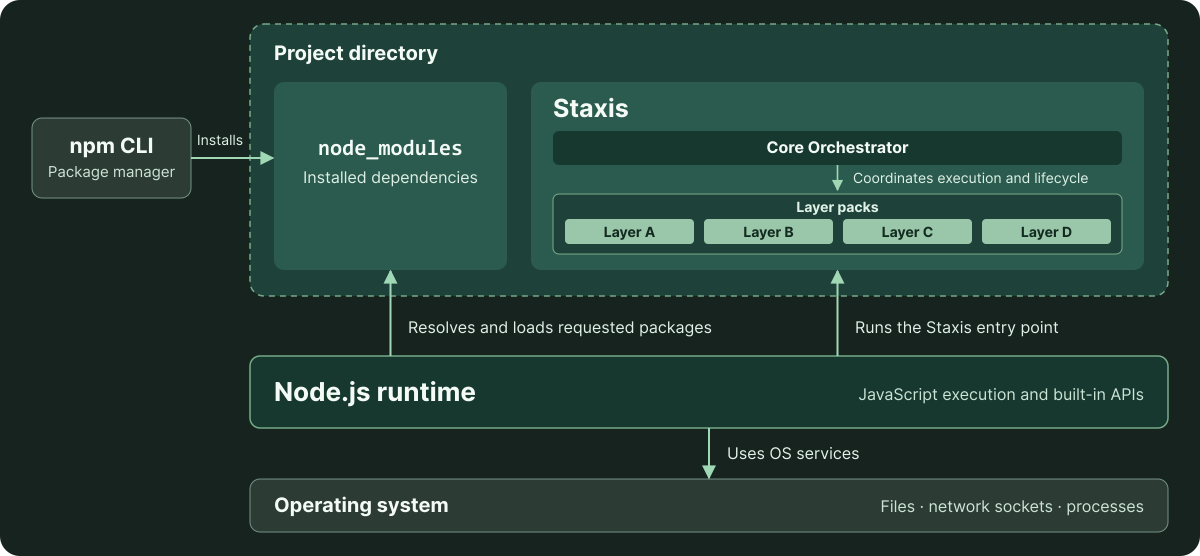
Core, Packs, and Layers
Staxis consists of several sections, two in particular:
- the core orchestrator
- the manager
They are all preinstalled with Staxis without you having to understand anything.
The Staxis core functions as an orchestrator with built-in security. Its job is to retrieve the packs you install in a specific folder (similar to npm, but tailored to your software) and launch them. Before launching, it performs specific checks, signs them, and then initializes them... from that moment on, the pack is officially a layer of the orchestrator (or, if you prefer, of your software).
Let’s take a simple example about a stack:
- pack 01 -> some scripts to communicate with filesystems
- pack 02 -> some scripts to have a http and server configuration, like Express
- pack 03 -> some scripts to handle your Database, like MongoDB or SQL
- pack 04 -> some scripts to make your view engine, exeple for React
- pack 05 -> some scripts to handle some extras
Ideally, these are a realistic set of scripts for creating any web app. Obviously, they’re oversimplified, but the concept is the same.
Staxis will enter the folder containing your packs and their scripts, check whether they’re malicious, verify if they’re performing incorrect imports, and ensure they don’t exceed their designated boundaries. It will then copy their configuration, attempt to freeze them to prevent tampering, sign everything, and move on to the next script in the next pack.
The various scripts can communicate with each other, but you must have specific access permissions. For this purpose—and to address the ease with which everything can be accessed via a simple .env file—Staxis has its own powerful Vault and system… Nothing is left to chance here, but we recommend checking out the dedicated section for more details.
Staxis Manager
Staxis includes a very powerful helper: the manager
The manager is a collection of small scripts that can be used to do a wide variety of things. This isn't the right place to go into detail, but to give you an idea, with it you can:
- Launch Staxis, check the installed Core version, and update the Core.
- Create a ZIP backup of the project.
- Browse the official and community pack catalogs.
- Install or remove individual packs, or install a set of packs from a .roll profile.
- Initialize a local pack and export it to a local folder or a Git repository.
- Submit a pack for inclusion in the official or community catalog.
And more... visit the right secton to undestand any possibilities
How does security work?
Staxis combines several mechanisms:
-
Configuration-defined boundaries:
Guardian checks imports, dependencies, and filesystem access patterns. Supported dynamic imports and file access go through dedicated runtime gates. -
Vault:
access requests, tokens, and keys for managed layers are governed by permissions declared in pack manifests. -
Integrated security levels:
low-security disables HMAC and Guardian checks; strict-security enables HMAC and reports Guardian violations; max-security enables HMAC and blocks Guardian violations.The default is max-security when no security profile is provided.
-
Core-issued runtime bundles:
the Core creates and marks layer bundles with an HMAC-derived identifier firm, checks bundle identity, and supervises authorization and lifecycle state during attach and detach. -
Snapshots and HMAC integrity checks:
covered pack JavaScript files are checked when loaded and again when managed layers are requested during execution. Changes to the .hmac registry during runtime are also checked.
Protection depends on the selected profile and configured rules. These controls complement application review, testing, and infrastructure security.
It goes without saying that Staxis cannot operate outside its own scope, that is, below the level where Node.js operates and where the operating system operates.
The security provided by Staxis is therefore a starting point, a set of sound (though, by their very nature, never exhaustive) perspectives and practices for building an orchestrator and software... not the definitive set of cybersecurity rules to be applied.